Protein Folding Stability Database Tutorial
What is C-Half?
Protein folding is a crucial process in biology, as a protein's function depends on its unique three-dimensional structure. C-Half (C1/2) is a powerful metric used to quantify the stability of a protein's folded state. You can think of it as the concentration of a chemical denaturant (like urea or guanidinium chloride) needed to cause a protein to become 50% unfolded. In this sense, it's similar to a "half-life" for a protein's stability.
- A higher C-Half value means the protein requires a greater concentration of the chemical to unfold. This indicates a more stable protein.
- Conversely, a lower C-Half value signifies a less stable protein that is more susceptible to unfolding.
By measuring the C-Half values of a protein's residues, we can create a profile of its stability, highlighting both stable and unstable regions.
What is Mutation Data?
Protein mutations are changes in a protein's amino acid sequence. These can be as simple as a single amino acid substitution or a more complex change. On this website, mutation data represents these changes, providing a critical layer of information for understanding how genetic variations might impact protein function and stability.
- Mutation and Disease: Many mutations are known to be linked to specific diseases, as a change in protein structure can disrupt its normal function.
- Visualizing Mutations: Our platform visualizes these changes, allowing you to see how mutations are distributed across a protein's sequence and how they correlate with C-Half values. This can help researchers identify potential links between a genetic change and a physical property of the protein.
The Cohort Concept
In data analysis, a cohort is a group of individuals who share a common characteristic. On this website, you can filter individuals into custom cohorts to compare protein stability across different populations.
- Filtered Cohorts: You can create cohorts based on various metadata, such as age, BMI, sex, or disease status. For example, you can compare the average C-Half values of a protein in a cohort of individuals with a specific disease to those in a healthy control group.
- Comparative Analysis: By using cohorts, you can go beyond a single protein's data and perform comparative analyses to see if protein stability differs between groups. This provides valuable insights into how individual characteristics affect protein health.
A Guide to the Interactive Graph
The main interactive graph displays the average C-Half values for a protein's residues.
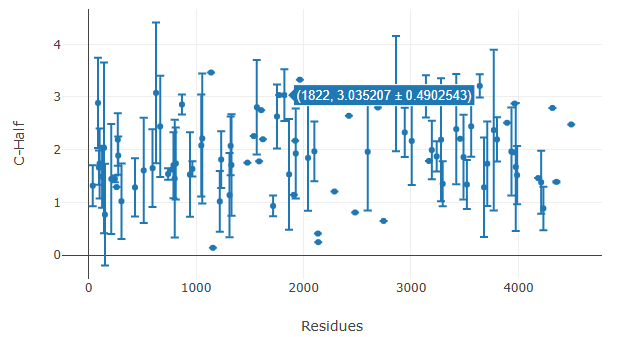
Figure 1: Using the Hover-to-Inspect Feature
Interactive Features
- Hover-to-Inspect: Hover your mouse over any data point to view details like the residue position, average C-Half value, and standard deviation.
- Pan and Zoom: Use the Plotly toolbar to zoom in on specific regions and pan across the graph for detailed analysis.
- Cohort Colors: When you group data, the colors of the data points correspond to different cohorts, as shown in the legend below the graph.
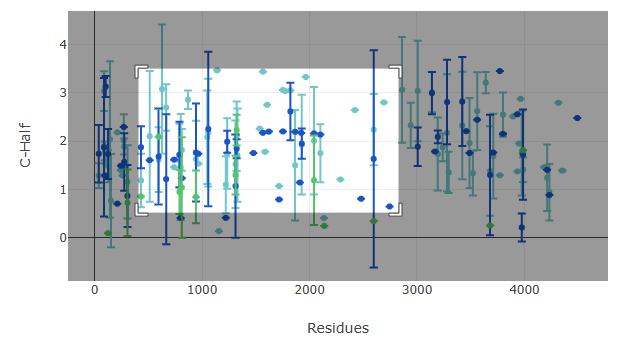
Figure 2: Using the Pan and Zoom Feature
Step-by-Step Walkthrough
- Searching for a Protein: Enter a protein Accession number (e.g., "P02768|ALBU_HUMAN") into the search bar on the homepage and click 'Search'.
-
Filtering Individuals: Click the "Filter Individuals" button on the left sidebar to open the modal. Here you can add or remove filters to define a custom cohort.
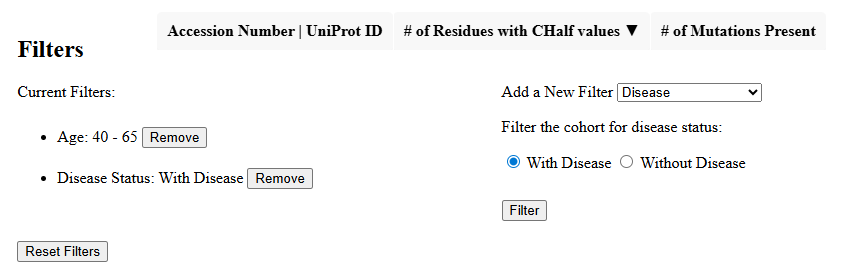
Figure 3: Applying a Filter in the Modal
-
Grouping by Variable: Use the "Group Data by Variable" dropdown to sort the data into different cohorts. For example, selecting "Sex" will divide the data into Male and Female groups.
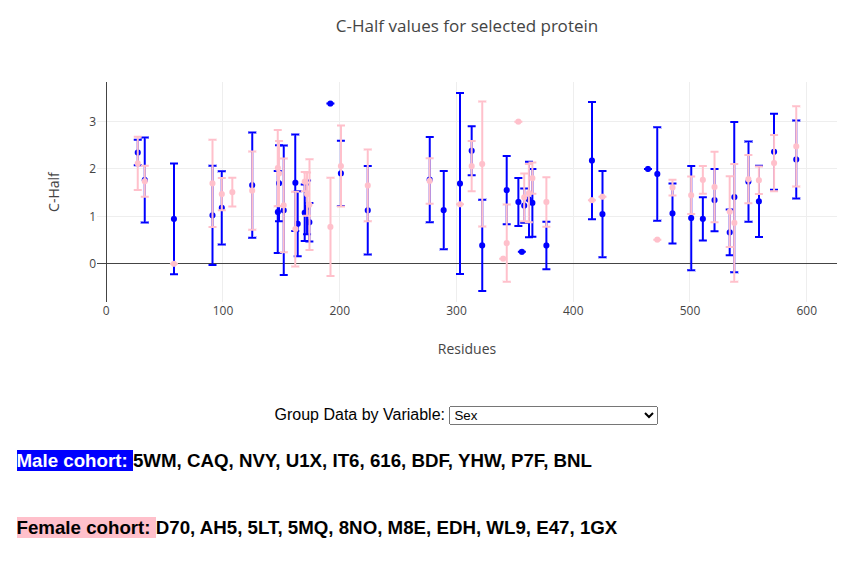
Figure 4: Grouping Data by Sex
Advanced Features and Troubleshooting
- Recoloring Cohorts: If the colors are hard to distinguish, use the "Recolor Cohorts" button on the left sidebar to generate a new, random set of colors.
- Interpreting Results: Look for significant differences in C-Half values between cohorts. These differences may indicate a change in protein stability related to the group's characteristics.
Ready to Begin?
Start your research journey by exploring our extensive protein database. Have a question? Reach out to our team via the contact information on the main site.